
Convert your old MiniDV Tapes to .DV files and .MP4 files
I was unable to find a free way to convert old tapes I found from 2004, so I wrote some utilities to do it using ffmpeg.
Requirements: Windows 10 or 11, and ffmpeg
Using PowerShell,
capture.ps1

This will capture to a .DV file incuding timestamps. A complete tape will be about 18GB
timestamps.ps1
This will pull the timestamps our of the dv file into a subtitle track, since this data is lost when you convert.

convert.ps1
This converts your .dv file to MP4, which will take the file from 18GB to about 4GB
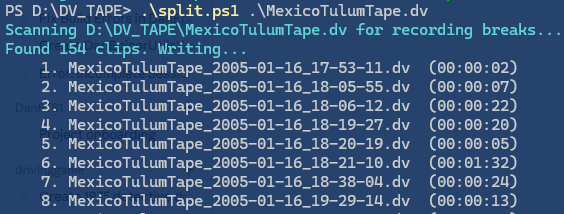
split.ps1
This splits the raw .dv file to seperate files based on the timestamp, and labels the files
join.ps1
After splitting, this will rejoin the files specified back to one dv so if you had grandma’s party and some other stuff on one tape, you can rejoin those events before you convert to MP4
That’s it!
Recent Comments